
GETTING STARTED
Know your board.
Read the comparison.
Use Odds Edge to compare sportsbook prices, Parlay Builder to combine eligible legs at one book, and DFS Edge to compare prop lines. Here’s the mobile-first path through setup, estimates and supported slips.
Updated October 26, 2026 · Examples are illustrative, not live recommendations.Start on your phone.
- Open your Whop invitation or checkout link and join with your own Whop account.
- Sign in to PropGoat with that same account. The tabs run Odds Edge → Parlay Builder → DFS Edge. Choose prices, sportsbook slips or DFS line differences.
- Check Updated near the top. Tap Show filters on Odds Edge or Filters on DFS Edge to open extra controls.
These steps use the mobile view. On desktop, the same settings sit above the table and comparisons appear in columns.
Set up Odds Edge in a few taps.
- Choose your books. Tap Show filters → Books & more filters → Target books. Select the sportsbooks you want eligible for EV and best-price results. Use the books you can actually access; leave others unchecked.
- Choose what you see. In Books & more filters → Comparison columns, choose the books you want to compare. On your phone, these appear inside each card’s Compare books list; on desktop, they appear as table columns. This changes visibility, not which target offers qualify.
- Keep Pinnacle as your starting reference. Open De-vig books. A new setup starts with Pinnacle only selected. You can add Novig or another reference later; each creates separate results. Your previously saved choices are preserved. Showing Pinnacle or Novig in comparison columns does not select them as de-vig books.
- Set your sportsbook location. Under Books & more filters, select your own Sportsbook location for supported links. This does not change your device location or bypass a sportsbook’s location checks.
- Narrow the board. Choose a league, game or market, or search for a player. The default target odds range is −200 to +150. Keep Positive EV only on if you want qualifying positive estimates. Adjust minimum EV and target odds to suit your view, then tap Hide filters to return to compact cards.
Three separate choices: target books decide eligible offers; comparison columns decide visible prices; de-vig books supply reference probabilities.
Odds Edge: compare the price.
Start with your reference book, target books and minimum EV. Pinnacle alone is the default de-vig reference for a new setup. You can display Pinnacle and Novig together to see props covered by either book. In Independent mode, each reference produces its own qualifying result, including selections covered by only one chosen book. Weighted Consensus is an optional alternative described below.
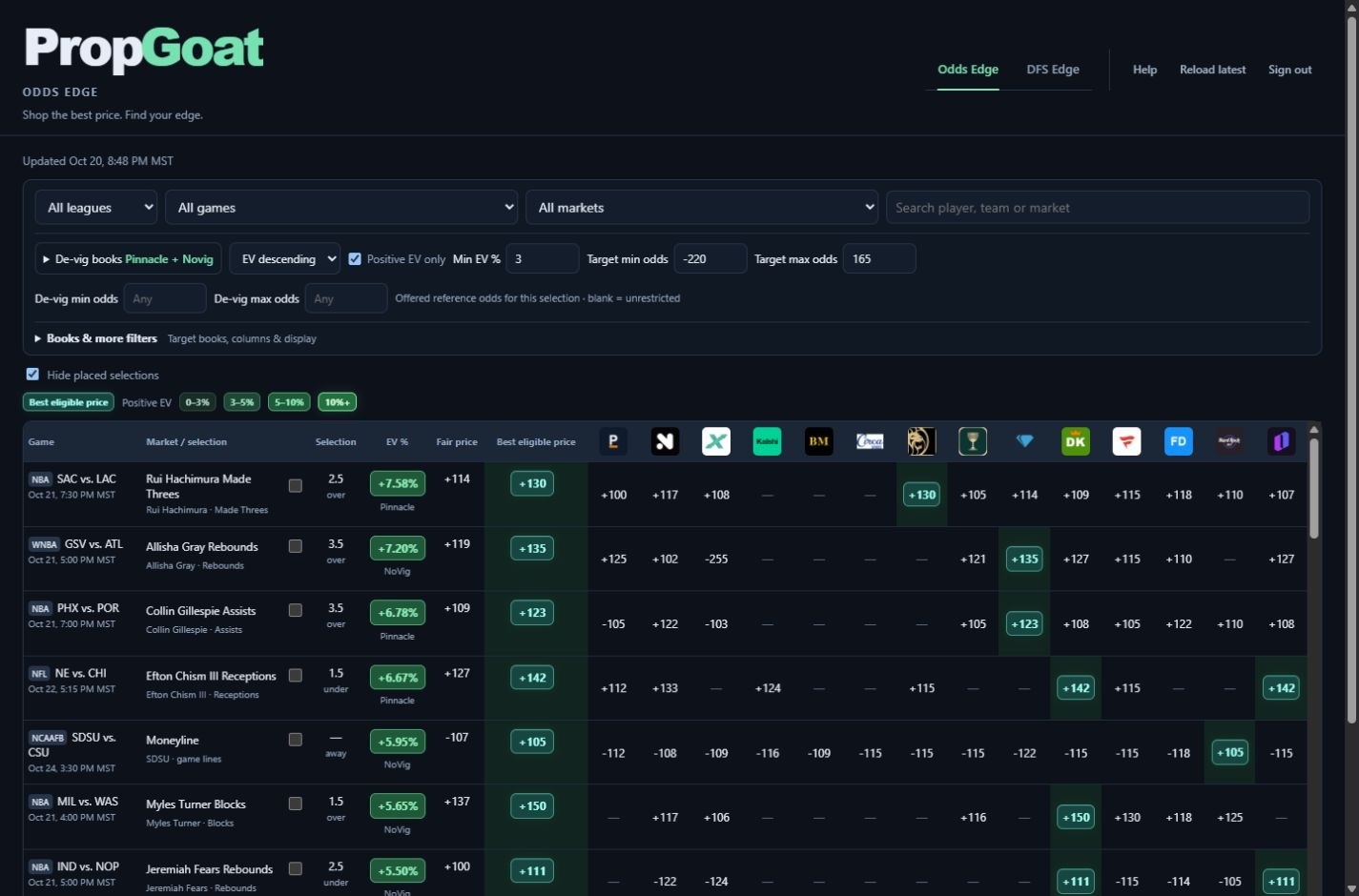
- Selection: the side and line being compared, such as Over 6.5 receptions. Compare the same market and line.
- Reference / de-vig book: the source of the two opposing prices used to estimate probability. De-vigging removes their combined margin proportionally.
- Fair price: that estimated probability expressed as odds. It is a reference-based estimate, not a known true price.
- EV %: estimated expected value at the offered price, using that reference probability and supported fee adjustments. It is not the chance of winning.
- Best eligible price: the best qualifying target-book offer under your filters and the board’s fee rules. Other displayed quotes can be comparison-only.
Suppose the reference has −110 on both sides. Removing the combined margin gives an estimated 50% chance per side: fair odds of +100.
An offer of +110 pays $110 profit on a $100 stake. Under the 50% estimate, before fees: EV = (0.50 × 2.10 − 1) × 100 = +5%.
This does not mean a 5% win chance or a guaranteed return. A different reference or price can change the estimate. See the EV explanation for more.
Consensus: require agreement, not just coverage.
On Odds Edge, open Show filters → Reference model → Weighted consensus. On desktop, use Filters → Reference model. Independent is the default for a setup without saved Consensus settings. These modes remain separate; adding a comparison column does not make that book a reference.
- Choose references and weights. Select at least two. Weights are relative: 50 / 50 is an equal blend; 40 / 30 / 30 gives Pinnacle more influence. The calculation averages each book’s de-vig probability, not its American odds.
- Set Minimum available. This is the minimum number of valid contributing reference pairs after coverage, reference-odds and width checks. Required books must be present. Missing optional books redistribute their weights.
- Set Minimum meeting EV. This is how many contributors must individually meet your minimum EV against the same target-book price. Having a quote is not agreement.
- Review the row. Both the weighted consensus EV and the agreement threshold must pass. The target sportsbook cannot contribute to its own blend; removing it can leave too few books. Details show the contributing books, effective weights, fair odds, individual EV and missing references.
Pinnacle estimates 54% (+8% EV); Novig 52% (+4% EV); Bookmaker 49% (−2% EV). The weighted probability is 51.9%, giving +3.8% consensus EV. With a 3% minimum and two books required to meet it, the result qualifies. Bookmaker’s disagreement stays in the blend.
If Bookmaker is missing and optional, the remaining weights become about 57.1% / 42.9%. If it is Required, its absence blocks the result.
Why can Consensus show zero results?
Each contributor must pass your reference limits. With a maximum market width of 30¢, a Pinnacle pair at 32¢ is excluded even if both Pinnacle and Novig would show over 3% EV. One remaining reference cannot satisfy a two-book requirement. A visible sharp-book quote also does not prove a valid opposing pair exists. Check target books, placed selections, width, game filters and the individual EV breakdown.
Agreement is additional context, not a calibrated confidence score. References can share the same pricing error. Optional Kelly sizing on an Odds Edge consensus row uses that row’s consensus probability and selected target offer.
Parlay Builder: from eligible lines to one draft.
Tap Parlay Builder between Odds Edge and DFS Edge. The selector lists books with supported multi-selection handoffs. Availability still depends on the book, market, device and your saved sportsbook location.
- Choose one book. Use league, game and search to narrow the list. The builder inherits Odds Edge’s minimum EV, target odds range, reference-odds limits, width limits and independent reference choices. Odds Edge’s Consensus mode does not carry into Parlay Builder.
- Tap a prop card. Tap anywhere to select or deselect a leg. Selected cards illuminate with a checkmark. Selecting the same prop under another reference changes the reference, rather than adding a duplicate leg. Clear the draft before changing books.
- Read the prices correctly. The center mini icons show the sharp books’ posted prices, in Pinnacle, Novig, Bookmaker, Circa order when available. The right side shows the target offer, the named reference’s de-vig fair price, and the EV calculated against that reference.
- Use Build Slip. On mobile, the bottom dock keeps the leg count, combined odds, baseline EV, Clear and the send-to-book action nearby. Tap Review to see the legs directly and access location and estimate details. On desktop these controls sit beside the results.
- Review updates. Drafts are checked against the latest published snapshot. A changed price or reference requires Accept update; remove unavailable or started legs. A failed freshness check blocks the handoff. Polling does not turn the underlying snapshot feed into live odds.
- Send and confirm. With 2–20 valid legs and a supported location, use the send-to-book action. Confirm the selected legs, parlay mode, current odds, final payout, rules and stake at the sportsbook. Some links only open a book or load selections without selecting parlay mode. PropGoat does not place the wager.
Two independent legs at +110, each with an estimated 50% win probability, have +5% individual EV. Standard multiplied odds give decimal 4.41 (+341), a 25% combined probability, and +10.25% baseline EV: (0.25 × 4.41 − 1) × 100.
The estimate assumes independence and standard multiplied payouts. Same-game correlation, sportsbook payout reductions and parlay-specific fees are not modeled. Same-game combinations show Unadjusted estimate; this is not a calculated same-game edge or a quoted sportsbook payout.
Placed selections stay separate. Hiding a placed bet on Odds Edge does not hide an eligible leg in Parlay Builder. Drafts stay in the current tab; Clear removes that draft without changing your Odds Edge placed records.
DFS Edge: compare the line.
Select your Target DFS platform first. Compare its player/stat line with your selected independent DFS peers. More favors a lower target line; Less favors a higher target line.
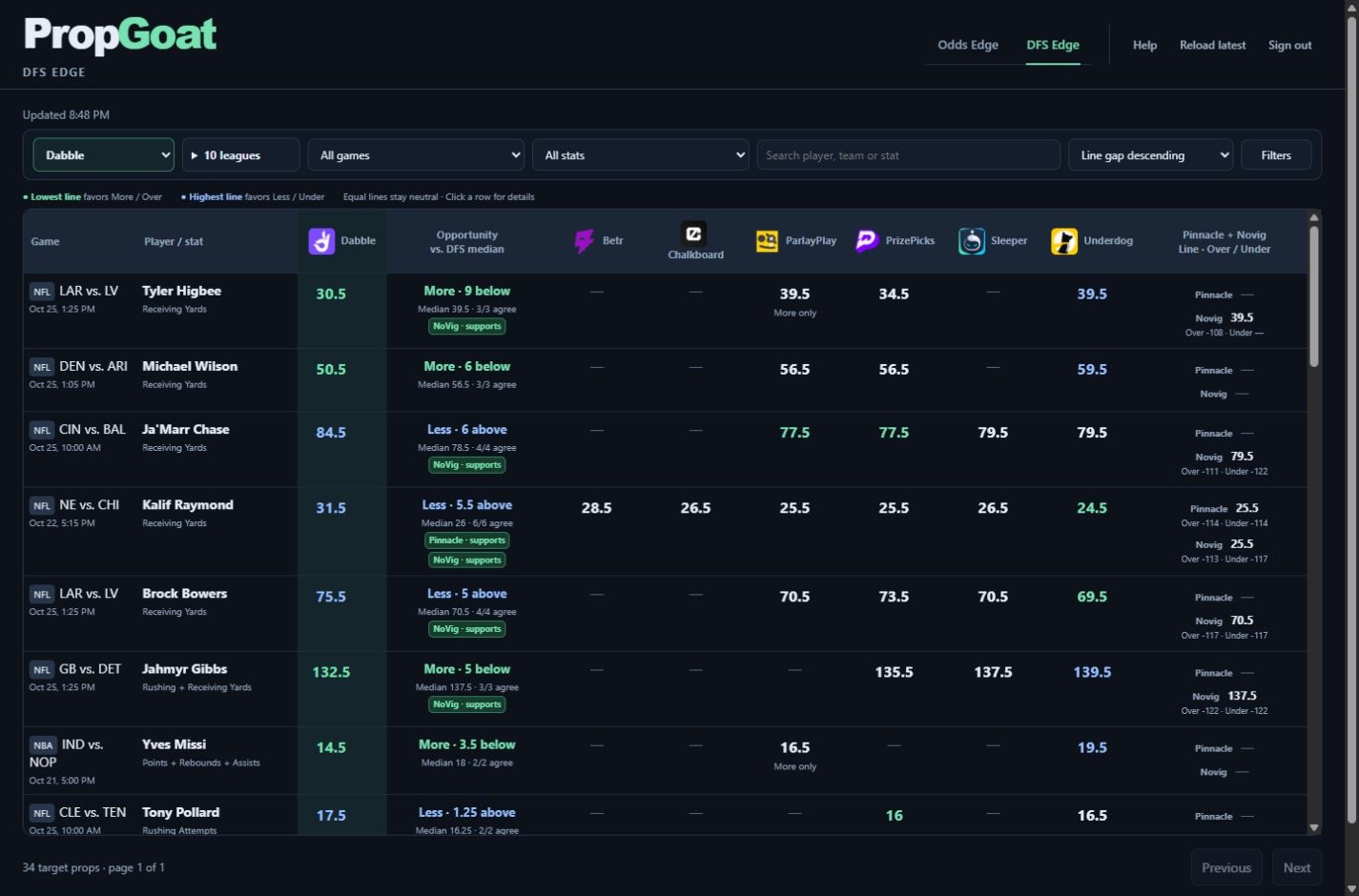
- Target line: the actual number offered by your chosen DFS platform.
- Peer median: the middle of the independent comparison lines. With two peers, it is their average.
- Line gap / opportunity: how far the target sits above or below that median, in the stat’s own units.
- Peer agreement: how many available independent peers sit in the favorable direction. It describes agreement, not a win probability.
- Pinnacle + Novig: separate reference coverage for context. Supports means the reference comparison aligns with the direction; disagreement means it points against it. No coverage means there isn’t usable reference data, not that the play is bad.
Target receiving yards: 51.5. Two DFS peers: 56.5 and 59.5. Their median is 58.
The target is 6.5 yards below the peer median (58 − 51.5), favoring More relative to those peers. Both peers are higher. The target line is still 51.5; 6.5 is the difference.
This is not 6.5% EV. DFS payouts, entry structure and settlement rules are not included in the line-gap comparison.
Default sorting is Line gap descending. It puts larger raw differences first. Yardage and reception gaps use different units, so a higher row is not automatically a better bet across stats. Filter to a stat for a closer comparison. Optional Opportunity ranking is a comparison heuristic, not a calibrated probability or payout-adjusted EV.
Keep the view useful.
- Leagues, games, stats and search
- Narrow the pool before comparing. The main bar holds common controls; Filters opens the additional settings.
- Odds Edge: minimum EV and target odds
- Minimum EV limits qualifying estimates. Target minimum/maximum odds limit eligible target-book offers. Reference odds limits apply to the reference’s offered price before de-vigging.
- Odds Edge: books and references
- Target books determine eligible offers. Reference books determine the probability estimate. Display columns control which comparison quotes you see; a visible quote need not qualify as the best offer.
- DFS Edge: minimum gap and minimum peers
- By stat uses a gap in each stat’s own units. Minimum peers requires enough independent comparisons. Target outliers only keeps target lines outside the peer range, subject to your other filters.
- Stake sizing
- Open the additional Odds Edge filters, then Stake sizing, for optional fractional Kelly estimates. Settings and probability assumptions affect the suggested stake; it does not account for all open or correlated bets.
- Hide placed selections
- On Odds Edge, hides selections you manually marked as placed. This does not hide legs in Parlay Builder. It does not read your sportsbook account or detect placed bets automatically.
- Saved views and settings
- Save a useful filter setup for later. Personal preferences belong to your signed-in account; review active filters if expected rows disappear.
Compare, open and review a bet.
Compare on your phone
Read the card’s player, market, side and line first. Best eligible price highlights a qualifying target-book offer; Fair price and the reference logo explain the comparison. Tap Compare books to see your selected comparison books, or All quotes & details for more information. Compare the exact same selection and line. For example, +120 pays more than +110 for the same winning bet; −105 costs less than −115 to win the same amount.
Open a sportsbook selection
- Tap a linked price in the card’s best-price area or expanded Compare books list. A supported link can load the selection into the destination bet slip. If several books share the best price, use the linked price beside the specific book you want in Compare books.
- Choose your own sportsbook location when prompted. PropGoat does not infer it from the VPN.
- At the sportsbook, sign in if needed, confirm the player, side, line and current odds, enter your stake, and submit there only when you are ready. PropGoat does not submit the bet. Transfer support varies by book, market, device and location; some links open the book without loading a selection, and some prices have no supported link.
Mark placed bets and show them again
- After placing your bet at the sportsbook, return to its Odds Edge card and tap the Placed checkbox beside the fair-price area.
- In Mark bet as placed, choose the correct Book & odds and tap Mark placed. This records the selection; it does not place a bet or verify your sportsbook account.
- Hide placed selections, above the cards, is on by default. Marked selections disappear from the current results. Turn it off to see them again.
- To undo a placed mark, turn Hide placed selections off, find the card and clear its Placed checkbox. Turn hiding back on whenever you want.
Placed marks are manual reminders, not a bet-history or settlement tracker. Clicking a sportsbook link alone does not mark a bet as placed.
Optional stake sizing
Under Show filters → Stake sizing, enable Show Kelly stakes and enter your bankroll to show an estimated stake beside the selection. The initial settings are ¼ Kelly with a 1% cap. Full calculations are in All quotes & details. Reference probabilities are estimates; do not add Pinnacle and Novig stake estimates for the same bet.
PrizePicks slip builder
- In DFS Edge, choose PrizePicks as your target.
- Use Select prop or the supported target-line action to add props. Review the displayed More/Less directions in the slip list.
- Open the combined slip in PrizePicks. Confirm the current lines, availability and entry eligibility there.
Multi-pick handoff currently supports PrizePicks. Other DFS platforms remain comparison views. Opening a link does not place a bet or submit an entry.
The quick glossary.
- Prop / market / line
- A prop is a player/stat proposition. The market identifies what is measured, and the line is the threshold, such as 51.5 receiving yards.
- Over / Under · More / Less
- The chosen direction relative to the line. Check the platform’s exact settlement rules.
- American odds
- +110 means $110 profit per $100 staked; −110 means staking $110 for $100 profit. These describe payout, not certainty.
- De-vig
- Removing the reference market’s combined implied margin to form a probability estimate.
- EV
- Expected value under an estimated probability and offer. Positive EV can still lose.
- Sharp-book support
- Alignment with a reference comparison. It adds context but does not independently prove value.
- Missing coverage
- No usable quote or comparison for that selection. A dash is not zero odds or a negative recommendation.
Check freshness and coverage.
Updated shows the snapshot’s collection time. Reload latest loads the newest published data; it does not request a fresh collection for your account. If a collection fails, the previous validated snapshot can remain visible, so check its age.
A market can appear at one reference and not another. Missing opposing reference prices, quality checks or unknown fees can prevent an EV estimate even when comparison odds are visible. Filters, a changed line, a started game or missing data can also remove a row.
On desktop, open a row for details. On a phone, expand the card to see more comparisons. If something looks wrong, note the board, player/stat, line, reference and displayed update time when reporting it; do not include credentials.